SharePoint Online [SPO] is a modern, cloud-based service accessible from any modern browser. Emphasis on modern service and modern browser. Still, because of many legacy business processes, end-users flock to sync their SPO files the first chance they get. They ultimately achieve the same purpose, but there are actually two ways they can sync their documents. From the library menu of options, they can choose to (1) Sync or (2) Add shortcut to OneDrive:

To block library syncing is easy enough. Anyone with elevated permissions to the document library can open the Library settings and choose to NOT allow items to be downloaded offline:
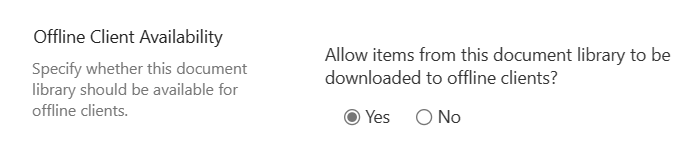
Not allowing items to be downloaded offline removes the Sync button from the menu:

Unfortunately, getting rid of the shortcut button isn’t as simple. Enabling or disabling this button is a tenant-wide setting, so it’s all or nothing. That is without using JSON to format the library view. Tweaking the menu, JSON can customize the command bar and hide this specific button:
{
  "$schema": "https://developer.microsoft.com/json-schemas/sp/v2/row-formatting.schema.json",
  "commandBarProps": {
    "commands": [
      {
        "key": "addShortcut",
        "hide": true
      }
    ]
  }
}
Now, with the JSON formatting applied, the Add shortcut to OneDrive button is hidden from everyone:

Conclusion:
JSON formatting is a quick win to tweak list and library menus without depending on CSS or JavaScript. No client-side scripting experience necessary…
“Rule-following, legal precedence, and political consistency are not more important than right, justice and plain common-sense.”
W. E. B. Du Bois
#BlackLivesMatter
 console.log('Charles');
Just what I needed to keep people from accidentally clicking on this and breaking the local file sync for SharePoint libraries. Thanks.
LikeLiked by 1 person
Those pesky people…
LikeLike
Please Update to
addShortcutToOneDriveCommandIt was recently changed per Command bar customization syntax reference | Microsoft LearnLikeLike