Scenario: I have a data source with thousands of addresses, and their street names need to be searchable in a canvas app.
Problem: There are similar streets in other cities, so search results will contain duplicates.
Workaround: Group similar addresses and display the NumberOf duplicates using the Power Fx‘s GroupBy function.

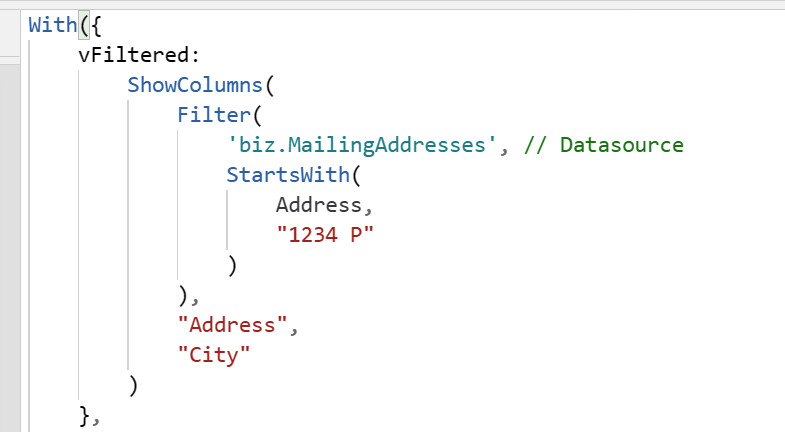
Building out the logic, use nested With() functions to essentially create a new dataset. In the top-level With(), Filter() the data source and store the results using an inline variable, vFiltered:
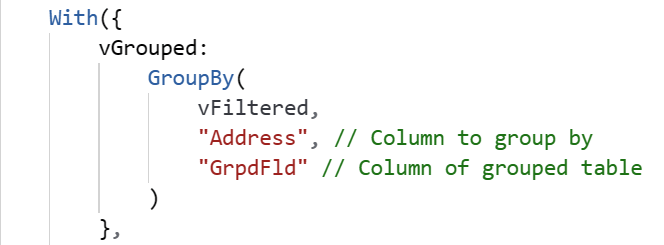
In the nested With() function, GroupBy() the previously filtered dataset using the street addresses as the key, which are the duplicates, and store these results into a different inline variable, vGrouped:
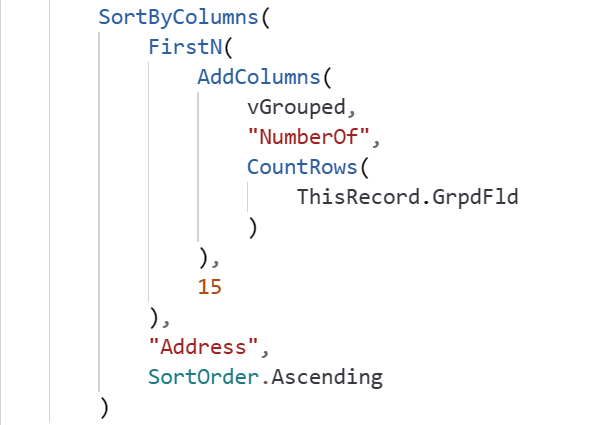
Using the vGrouped variable as the new data source, AddColumns() and list the duplicate counts, then sort the dataset:
With the Power Fx logic shaping the filtered data source, the canvas app displays the results in a vertical gallery and includes a count of duplicate addresses:

Conclusion:
Power Fx is surprisingly capable. Even as a formula language, it can tackle some pretty complicated tasks.
“We are all one – and if we don’t know it, we will learn it the hard way.”
Bayard Rustin
#BlackLivesMatter

