Document sets aren’t new to SharePoint Online (SPO), but plenty of organizations are just discovering them as they’re a great way to bundle related documents. And document sets allow organizations to group and manage these related files as a single entity, defining metadata for the entity instead of individual files.

Now, for the ask. Can a Power Automate cloud flow create document sets? Yes, and very easily.
Though, the cloud flow should first check that the document set doesn’t already exist before trying to create it. Otherwise, Power Automate will hang before the cloud flow eventually times out.
To check whether or not the document set exists. initialize and populate three variables:
- documentSetName [ String ]
- documentSetPath [ String ]
- documentSetExists [ Boolean ]

For the documentSetName variable, assign the name of the document set. For the documentSetPath variable, assign the internal relative path of the document library, then append the documentSetName variable:

With the variables initialized, add the Get folder metadata using path action to the cloud flow. If the document set exists, then this action will successfully return some data because document sets are a type of folder. However, if the document set doesn’t exist, then this action will fail spectacularly:

Populating the Get folder metadata using path action properties, specify the “Site Address,” then assign the documentSetPath variable as the “Folder Path”:

Now, add two actions to “Set variable.” The first action will set documentSetExists to false and the second action will set it to true:
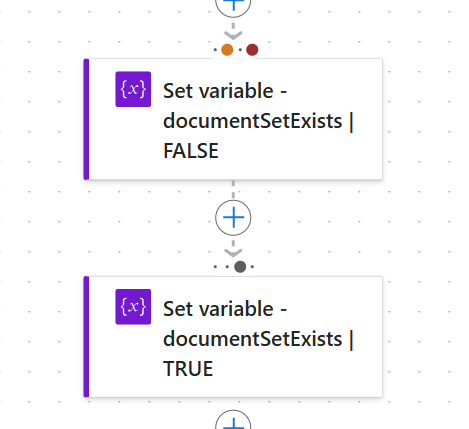
Next, open the Settings pane of the “Set variable” false action and change its “Run after” actions. Instead of running after Get folder metadata using path succeeds, have it run if that action fails, meaning the document set doesn’t exist:

Now, open the Settings pane of the “Set variable” true action and change its “Run after” actions. Because the previous action executed if the Get folder metadata using path action failed, this action should only execute if the prior action is skipped, meaning the document set does exist:

Finally, run the flow and check the result. Entering a dummy document set name, the flow should fail because it doesn’t exist. But also, because the flow is expecting the Get folder metadata using path action to maybe fail, the flow itself doesn’t error out. Instead, this is a controlled failure, which allows the flow itself to run successfully.

Opening the Get folder metadata using path action, again, this action itself fails, but it doesn’t bring down the entire cloud flow. The document set doesn’t exist, resulting in a 404 error, but the “NotFound” error is gracefully handled:

Run the flow again, but with the name of a document set that actually exists in that target library. This time, the flow runs and successfully skips the “Set variable” false action, jumping to the “Set variable” true action.

Conclusion:
As organizations continue to adopt document sets, they will likely want to automate creating them using Power Automate, so flow makers will need to check whether or not the document set exists before they try creating it new. Fortunately, the “Run after” actions of a variable paired with the Get folder metadata using path action facilitates checking things pretty easily.
“Loss of social standing is an ever-present threat for individuals whose social acceptance is based on behavioral traits rather than unconditional human value.”
Melissa Harris-Perry
#BlackLivesMatter
 console.log('Charles');
Thanks for the code Charles, it allows you to get the result quickly.
LikeLike
You’re very welcome.
LikeLike
Pingback: Power Automate: SharePoint Online | Check If Document Set Exists [ v2 ] | console.log('Charles');