The ask, find another, another way to determine whether a document set exists or not. Still using the Deal ID value as the unique identifier, instead of adding the Get files (properties only) action [ option #2 ], use the Send an HTTP request to SharePoint action.
This particular HTTP request action takes advantage of the existing SharePoint REST APIs originally introduced during the SharePoint on-premises days. These REST actions are much more robust than the current list of named Power Automate actions. Taking advantage of this often-overlooked action makes a lot more automation possible:

Once the action is added to the cloud flow, populate the Site Address parameter as with any other SharePoint action, choose the HTTP Method, then build the Uri, per the provided example:

For those unfamiliar with these REST APIs, they’re essentially calls to SharePoint to perform very specific actions. The Method is the verb of the action to be performed, and the Uri specifies the instructions of what is being performed. Because today’s ask is to return something, this HTTP call necessitates a “GET,” which returns an array of items:

And because the ask is to return a document set matching a Deal ID, build the Uri and for its base, it needs to leverage the available “_api” of the current “web, ” the SharePoint site specified in the Site Address parameter. Next, it needs to query the target document library. Fun fact, document libraries actually inherit from content type “list”, so they’re also technically “lists.” Next, specify the target list using its internal name (or its GUID), then finally, get the list’s “items,” but only return a Deal ID match by filtering on the column’s internal name. Optional step, also filter against the document set’s ContentTypeId to return the parent document set, not any of its child items:
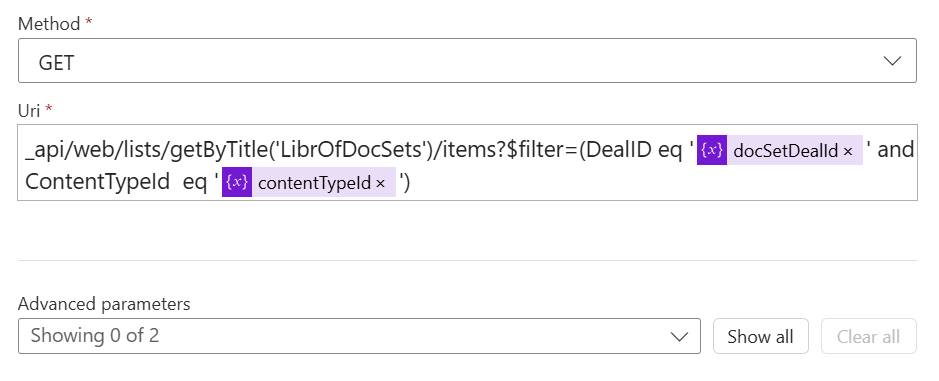
Okay, what does that return? Well, as with the Get files (property only) action, an array of results is returned. It is important to keep in mind that “items” is plural, so the result is always an array. There may only be a single item, but the expected output is still an array:

One more important thing to keep in mind, the output of the HTTP request is an array, but it is nested within the body’s “d” property, which has the “results” array:
- body(‘Send_an_HTTP_request_to_SharePoint’)[‘d’][‘results’]
Conclusion:
Power Automate doesn’t have named actions for everything SharePoint yet but leveraging the Send an HTTP request to SharePoint action more than makes up for any missing named actions.
“When we’re talking about diversity, it’s not a box to check. It is a reality that should be deeply felt and held and valued by all of us.”
Ava DuVernay
#BlackLivesMatter
 console.log('Charles');