This is likely to be a lengthy post because there was no ask today. I just wanted to stress test nested Power Fx With() functions a bit. My question, “Are there any performance concerns nesting With() functions?” To test this and maybe get an answer, I created a Power Apps canvas app to determine the winner of a department-wide poll using ranked choice voting (RCV).
Using a Microsoft Forms survey, everyone is asked to rank their preferred options, sorting the choices from most favorable to least favorable:

Exporting the survey responses to Microsoft Excel, we see that each response has the responder’s choices listed in their preferred order, using a semicolon as a delimiter:
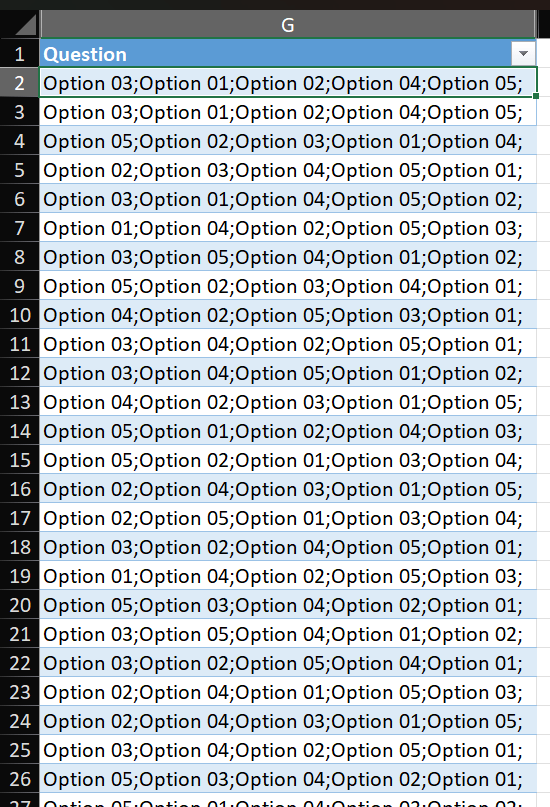
Now, with some slick formatting and fancy formulas, the app uses RCV to determine the winner after a few rounds of elimination. Unfortunately, the nested With() logic gets surprisingly long and would be too much to show here. The full Power Fx snippet has been added to my GitHub, but essentially, there is a parent With(), then 11 nested With() functions, each nested level processing the votes. To visualize the rounds, I added a blank vertical gallery, then nested a blank horizontal gallery for the individual votes per round:
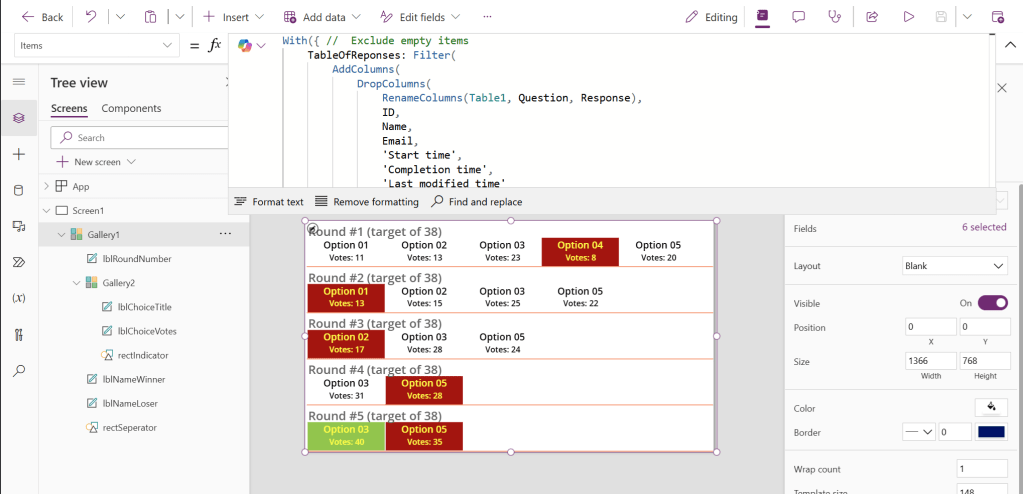
Highlighting several pieces of the logic, in the parent With() function, I created a table variable for the poll responses. Microsoft Excel response exports from Microsoft Forms includes unnecessary columns, so these are dropped, trimming the overall dataset.
Also, the ‘Question’ column is renamed to ‘Response,’ then the survey responses are split into an array using the semicolon as the delimiter. Note, because there is a semicolon at the end of each response, splitting the string into an array would result in an empty record. To avoid that, I filtered the array, keeping only the non-empty records.
Also, also, in a similar filter step, I only included non-empty poll responses:
TableOfReponses: Filter(
    AddColumns(
        DropColumns(
            RenameColumns(
                Table1,
                Question,
                Response
            ),
            ID,
            Name,
            Email,
            'Start time',
            'Completion time',
            'Last modified time'
        ),
        Ranks,
        Filter(
            Split(Response, ";"),
            Value <> ""
        )
    ),
    Response <> ""
)
Now, with the table variable initialized and populated, I use it in the first child With() function to store an array of the vote choices, then calculate how many votes will be needed to win by a true majority, rounding any decimal numbers up to the next whole number:
VoteChoicesArray: Filter(
    Split(
        First(
            TableOfReponses
        ).Response,
        ";"
    ),
    Value <> ""
)
NumbOfVotesNeededToWin: RoundUp(
    CountRows(TableOfReponses) / 2,
    0
)
Finally, let’s see who wins round #1. Use the array of choices to create another table, adding a column for the Total votes each option received as someone’s most preferred choice:
VoteCountsForRound01: SortByColumns(
    AddColumns(
        VoteChoicesArray,
        'Total',
        CountIf(
            TableOfReponses,
            First(ThisRecord.Ranks).Value = Value
        ),
        'Target',
        NumbOfVotesNeededToWin
    ),
    "Total",
    SortOrder.Ascending
)
The total votes per choice are counted above, then sorted in ascending order, making it easier to see who won and lost this round. The loser has the least votes, so they would be the first row in the table. In contrast, the winner would have the most votes and be listed last in the table:
Round01Loser: First(VoteCountsForRound01).Value,
Round01Winner: Last(VoteCountsForRound01).Value
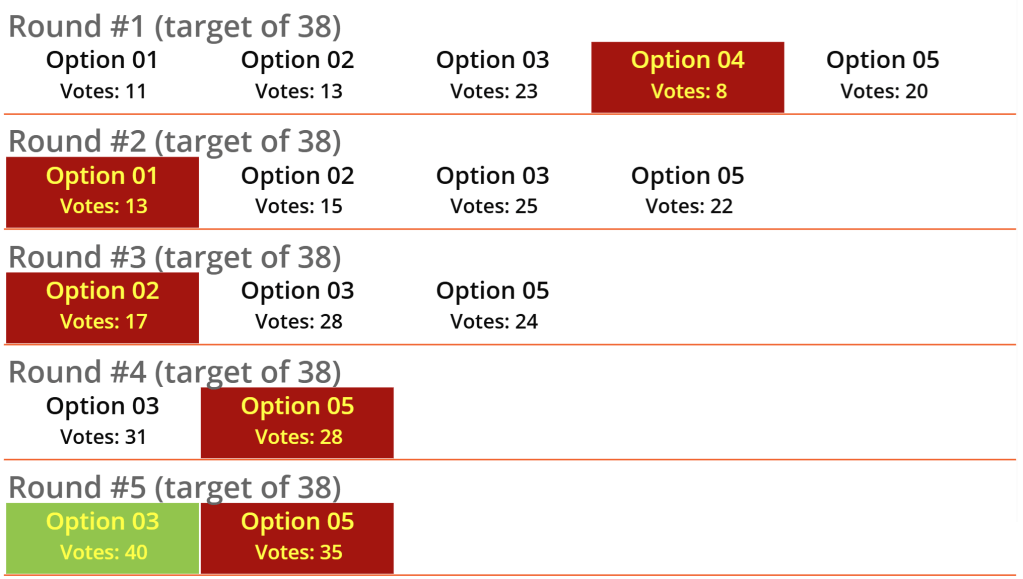
If no one wins the majority in round #1, then we commence with round #2. Here, I create another table using the array of choices but exclude the round #1 loser. Because they’re now eliminated from round #2, allocate their votes to their second most preferred choice. This process repeats for multiple rounds until there is a choice with a winning majority of the votes. By the time we get to round #5, the loser’s 2nd and 3rd preferred votes are allocated to the choices still in the running:
VoteCountsForRound02: SortByColumns(
    AddColumns(
        Filter(
            VoteChoicesArray,
            Not(Value = Round01Loser)
        ),
        'Total',
        CountIf(
            TableOfReponses,
            First(ThisRecord.Ranks).Value = Value ||
            (
                First(ThisRecord.Ranks).Value = Round01Loser &&
                Last(FirstN(ThisRecord.Ranks, 2)).Value = Value
            )
        ),
        'Target',
        NumbOfVotesNeededToWin
    ),
    "Total",
    SortOrder.Ascending
)
VoteCountsForRound05: SortByColumns(
    AddColumns(
    Filter(
        VoteChoicesArray,
        Not(
            Value = Round01Loser ||
            Value = Round02Loser ||
            Value = Round03Loser
        )
    ),
        'Total',
        CountIf(
            TableOfReponses,
            First(ThisRecord.Ranks).Value = Value ||
            (
                First(ThisRecord.Ranks).Value = Round01Loser &&
                (
                    Last(FirstN(ThisRecord.Ranks, 2)).Value = Value ||
                    Last(FirstN(ThisRecord.Ranks, 3)).Value = Value
                )
            ) ||
            (
                First(ThisRecord.Ranks).Value = Round02Loser &&
                (
                    Last(FirstN(ThisRecord.Ranks, 2)).Value = Value  ||
                    Last(FirstN(ThisRecord.Ranks, 3)).Value = Value
                )
            ) ||
            (
                First(ThisRecord.Ranks).Value = Round03Loser &&
                (
                    Last(FirstN(ThisRecord.Ranks, 2)).Value = Value  ||
                    Last(FirstN(ThisRecord.Ranks, 3)).Value = Value
                )
            )
        ),
        'Target',
        NumbOfVotesNeededToWin
    ),
    "Total",
    SortOrder.Ascending
)
Finally, finally, after several rounds of eliminations, create one more table, populated with winners and losers for each round, feeding the Items property of a vertical gallery. The “Dataset” value feeds the Items property of the nested horizontal gallery:
Table(
    {
        Round: 1,
        Dataset: VoteCountsForRound01,
        Winner: Round01Winner,
        Loser: Round01Loser
    }, {
        Round: 2,
        Dataset: VoteCountsForRound02,
        Winner: Round02Winner,
        Loser: Round02Loser
    }, {
        Round: 3,
        . . .
    }, {
        Round: 4,
        . . .
    }, {
        Round: 5,
        . . .
    }
)
The core app logic is complete. Now, for the next few steps, I format the UI by first inserting two label controls to the vertical gallery, then hiding them. These controls will be used to determine background and text colors of the nested horizontal gallery, indicating the round losers and overall winner:

Leveraging the previously hidden labels, add a rectangle to the background of the horizontal gallery, then add some logic to alternate its Fill property. Any color technically works, but red easily indicates loss and green indicates win:

Using similar logic as the rectangle Fill, choose a contrasting Color for the label controls used in the horizontal gallery for option title and total option votes:

One more optional control, insert a header label to the vertical gallery, indicating voting round:

After several rounds of elimination and some formatting, voila…
Conclusion:
Did I answer my question. Maybe. What I learned was that even with 11 nested With() functions, my app didn’t experience any notable performance issues. My guess, a reasonable number of With() functions is perfectly fine to nest. The real concern would be whether there is heavy logic being processed or not, which would technically impact any app’s performance…
“Never underestimate the power of dreams and the influence of the human spirit. We are all the same in this notion: The potential for greatness lives within each of us.”
Wilma Rudolph
#BlackLivesMatter
 console.log('Charles');