User-centered design should really be at the core of all app development. Functionality is essential, but a poorly designed interface can sink any app. With this in mind, more time should be invested in designing Power Apps…
Next in the series, recreating the Office App with SharePoint Online as a data source:

The first entry of this series loosely recreated Instagram using horizontal and vertical galleries. Shortly after, the next entry also used two galleries. Though, one gallery was nested within the other. This time, only the vertical gallery is used. Getting started, this app will need two empty collections:
Clear(listOfFiles);
Clear(uniqueDates);
The Office App home screen lists recently opened files. To recreate this list, use the Collect function and enumerate the data source. This populates the listOfFiles collection for the vertical gallery with four fields:
ForAll('appMockup-Office',
    Collect(listOfFiles,
        {
            Date: Text(Modified, "mm/dd/yyyy"),
            Name: Title,
            Path: Location,
            SortColumn: Text(Modified, "yyyymmdd")&"_File"
        }
    )
);
For the second collection, the Office App generalizes file groups by last modified date:
- E.g., Today, Yesterday, This Week, Last Week, etc…
Collect(uniqueDates,
    { Value: Text(Now(), "mm/dd/yyyy") },
    { Value: Text(Now() - 1, "mm/dd/yyyy") },
    { Value: Text(Now() - 2, "mm/dd/yyyy") },
    { Value: Text(Now() - 7, "mm/dd/yyyy") }
);
Now, with the general dates populated, append these uniqueDates values to the listOfFiles collection as listing headers:
ForAll(uniqueDates,
    Collect(listOfFiles,
        {
            Date: Text(Value, "mm/dd/yyyy"),
            Name: Text(Value, "mm/dd/yyyy"),
            Path: "",
            SortColumn: Text(DateValue(Value), "yyyymmdd")&"_Header"
        }
    )
);
Finally, the listOfFiles collection can be bound to the vertical gallery. But first, use the SortByColumns() function to order the records based on the custom SortColumn field:

- Data collection populated…
- Check!
- Data collection formatted…
- Check!
- Data collection bound to gallery…
- Check!

Bonus Tip #1: To return today’s date and time, use Now(). To specify the date format, use Text().
Text(Now(), "mm/dd/yyyy")
Text(Now(), "yyyyMM")
Text(Now(), "MM-dd-yy")
Bonus Tip #2: Specify a date in the past using Now() and subtraction. Positive numbers for future dates.
Text(Now() - 1, "mm/dd/yyyy")
Text(Now() + 1, "mm/dd/yyyy")
Text(Now() + 15, "mm/dd/yyyy")
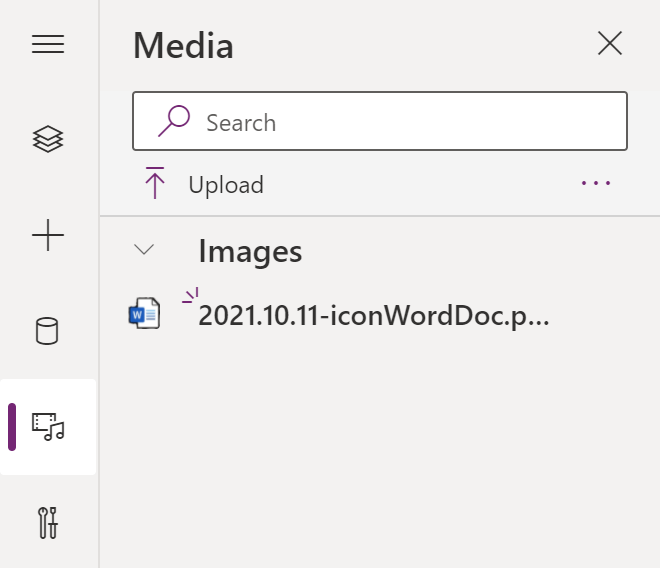
Trying something new, upload icons for the file extension images. The Power App Studio has a Media space for app artifacts. Insert the image to the gallery for each record of the collection:
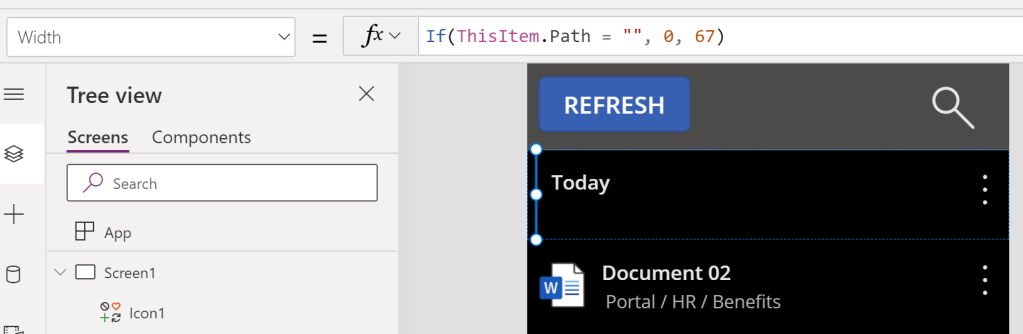
Next, some dynamic label text. The file entries of the listOfFiles collection have their relative paths populated. The header records were added with their Path property intentionally empty. If this property is empty, then hide the image by adjusting its width, which also influences the X property of the label:
Additionally, add some dynamic logic to hide/ show the More icon if the Path property is left empty:

For some added authenticity, add the Office App’s profile icon. This could also be inserted as Media, just like the Word icon. Or it could easily be recreated with some layered shapes:
- 1 peach circle for the background.
- 1 orange circle for the person’s head.
- 1 orange circle for the person’s body.
- 1 orange rectangle for the person’s shoulders.
- 1 peach rectangle to hide the top of the body circle; behind the head.

Recreating the Home / Shared toggle, this is essentially 2 rectangles and 3 circles:

And just because, recreating the Actions icon is just 4 clustered circles:

Finally, finally, before running the app, add some logic to the gallery’s label text property. Fundamentally, just some nested If-Then statements to determine label text:
If(ThisItem.Name = Text(Now(), "mm/dd/yyyy"), "Today",
     ThisItem.Name = Text(Now() - 1, "mm/dd/yyyy"), "Yesterday",
          ThisItem.Name = Text(Now() - 2, "mm/dd/yyyy"), "This Week",
               Text(Find("/", ThisItem.Name, 1)) = "", ThisItem.Name, "Older"
)
And with the label text dynamically rendered, the app is complete!

Conclusion:
Even with more complex apps, it doesn’t take long to build. Power Apps can be designed well, and look just like any other app…
“If you hear the dogs, keep going. If you see the torches in the woods, keep going. If there’s shouting after you, keep going. Don’t ever stop. Keep going. If you want a taste of freedom, keep going.”
Harriet Tubman
#BlackLivesMatter
 console.log('Charles');
Pingback: Power Apps: Recreating… Twitter | console.log('Charles');