Usage of Microsoft Teams boomed under COVID-19 shelter in place orders. For organizations with Office 365 licenses, Teams facilitated remote collaboration, but each newly created team provisions a [SharePoint Online] site collection.
Post-quarantine, organizations may want to audit their Teams’ provisioned SPO sites. And if end-users aren’t restricted from creating teams, then there will be plenty of sites mistakenly created by curious individuals. Though these teams can be queried using PowerShell and the Graph API…
Note:
Microsoft currently supports 2 million site collections per tenant.
Create request header:
- Provide {clientID}
- Provide [clientSecret}
function Get-GraphAPIHeader {
    [System.String] $TenantName = "{tenantName}.onmicrosoft.com"
    [System.String] $Url = "https://login.microsoftonline.com/$($TenantName)/oauth2/v2.0/token"

    $PostSplat = @{
        ContentType = "application/x-www-form-urlencoded"
        Method = "POST"
        Body = @{
            client_id = "{clientID}"
	    client_secret = "{clientSecret}"
	    scope = "https://graph.microsoft.com/.default"
	    grant_type = "client_credentials"
        }
        Uri = "$Url"
    }
    $Request = Invoke-RestMethod @PostSplat
    return @{
        Authorization = "$($Request.token_type) $($Request.access_token)"
    }
}
Batch Requests:
This function accepts an array of batch APIs, then creates the JSON object for the batch request…
function Get-GraphApiBatchResponse {
    param(
        [System.String] $GraphAPI = "https://graph.microsoft.com/v1.0",
        [Parameter(Mandatory)] [System.Array] $ArrayOfBatchRequests
    )

    $JSON = @{
        "requests" = $ArrayOfBatchRequests
    } | ConvertTo-Json -Depth 5
    $JSON | Out-Host

    return Invoke-RestMethod `
        -Uri "$($GraphAPI)/`$batch" `
        -Headers (Get-GraphAPIHeader) `
        -Body $JSON `
        -Method POST `
        -ContentType "application/json" `
        -UseBasicParsing
}
Query Office Groups:
Office 365 groups differ from AD Security Groups. Both are used to manage user permissions, but Office groups are user-managed rather than IT-managed. Additionally, Office groups are created and used by:
- Microsoft Stream
- Microsoft Teams
- Microsoft Planner
- etc.
The following function queries the tenant Office groups and iterates only the mail-enabled groups. With this smaller subset, the Teams provisioned groups are added to the hash table, $listOf:
function Get-GraphAPIGroups {
    $requests = @()
    $requests += @{
        "url" = "/groups"
        "method" = "GET"
        "id" = "1"
    }

    $listOf = @{}
    $response = Get-GraphApiBatchResponse -ArrayOfBatchRequests $requests
    $response.responses.body.value | ?{$_.mailEnabled -eq $true} | % {

        if ($_.creationOptions.Contains("Team")) {
            $listOf["$($_.mailNickname)"] = ""
        }
    }
    return $listOf
}
ex., PowerShell Output

Search SPO Sites:
For the list of Office groups, each entry is queried for a respective SPO site:
function Get-GraphAPISPOSiteIDs {
    param(
        [System.String] $GraphAPI = "https://graph.microsoft.com/v1.0",
        [Parameter(Mandatory)] [System.Collections.Hashtable] $HashOfSPOSites
    )

    $index = 1
    $requests = @()
    $HashOfSPOSites.GetEnumerator() | Sort-Object Key | % {

        $requests += @{
            "url" = "/sites?search=$($_.Key)"
            "method" = "GET"
            "id" = "$index"
        }
        $index++
    }

    $response = Get-GraphApiBatchResponse -ArrayOfBatchRequests $requests
    $response.responses | % {
        $temp = $_.body.value
        $HashOfSPOSites[$temp.name] = $temp.webUrl
    }
    return $HashOfSPOSites
}
ex., PowerShell Output
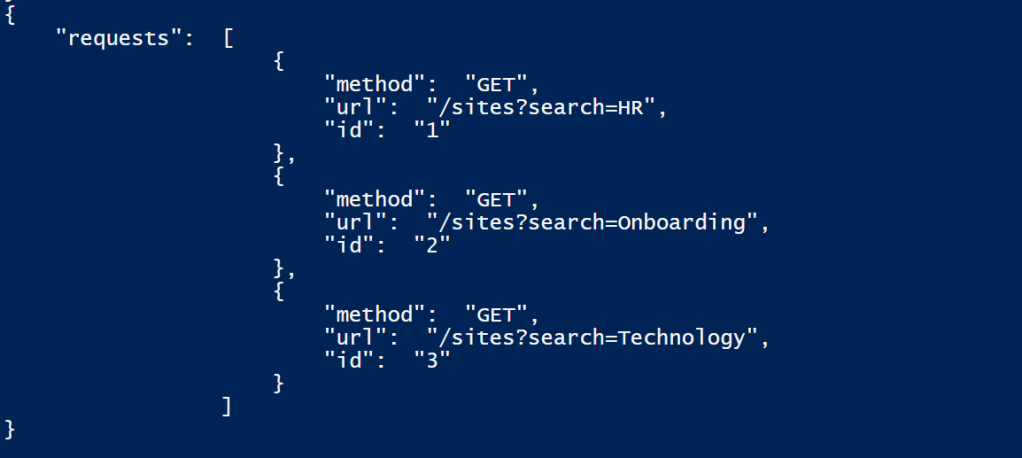
Output SPO Site URLs:
Pass the output of the first function as a parameter to the section function.
Get-GraphAPISPOSiteIDs -HashOfSPOSites (Get-GraphAPIGroups)
ex., PowerShell Output

Conclusion:
Post-pandemic audits should be interesting if the organization cares how many SPO sites currently exist. But determining which sites were provisioned from Microsoft Teams is simple enough…
“Mistakes are a fact of life. It is the response to the error that counts.”
Nikki Giovanni
 console.log('Charles');
How to check if site exists in tenant (both in active and deleted site list) using PowerShell graph?
LikeLike
Hi, Vas. Currently, the Graph API can only query active sites. You’ll need to use the “Get-SPODeletedSite” commandlet of the SharePointOnlinePowerShell module to search the recycle bin…
LikeLike