The ask, improve a long running cloud flow’s performance. It has a Get files (properties only) action querying 2,000 recent items which are filtered using a Condition block. Because the library already has 100K+ items, OData filters can be hit or miss, so the maker is iterating each returned item, causing the flow loop to run for 9+ minutes:

Fortunately, to improve this flow, the main logic doesn’t need to change much. It will still query the most recent 2,000 library items and delete the default the .txt files created with the document sets using the Send an HTTP request to SharePoint action, but a tweak is necessary to address the laborious processing:

That tweak, add a Filter array action to the flow. Pass in the body/value of the Get files (properties only) output into this new action, then specify how the array should be filtered. Because it needs to output only the default .txt files, the filter will target the .txt extension. Finally, pass the output of this filter action to the Apply to each control:
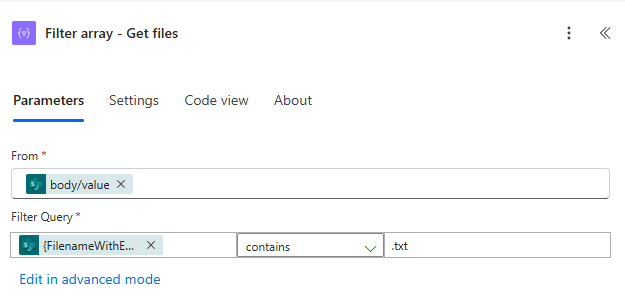
Now, with the Filter array action, the flow loop goes from 9+ minutes down to 8 seconds, only iterating the .txt files, not all 2,000 items:

Conclusion:
If the cloud flow has a GET large array action, an Apply to each loop control, and a Condition block, but no Filter array action, then there is likely room for improvement. Not every loop will have such a sizable boost in performance, but every bit helps in overall efficiency.
“We are way more powerful when we turn to each other and not on each other, when we celebrate our diversity, focus on our commonality, and together tear down the mighty walls of injustice.”
Cynthia McKinney
#BlackLivesMatter
 console.log('Charles');