The ask, see if there is a better way to conditionally update a Salesforce record whenever there is a value mismatch between it and SharePoint Online (SPO), the source system. There is already a Condition block with a nested Update record action, but can the condition logic be improved?

Because the Salesforce record should only be updated if there is a value mismatch, the maker added several rows to the AND logic, each matching against its respective SPO item value. Assuming each of these values match, there would be no need to update Salesforce. Otherwise, there is at least one value mismatch, so the Salesforce record is updated:

So, what is the concern? Well, the above works great when comparing just a few values. For this business case, however, the SharePoint item and Salesforce record have 20+ data points that need to be compared. Adding a row for each of these data points is possible but could be tricky to debug if the flow experiences any issues.
After a flow run, the Condition block doesn’t specify which values were mismatched, prompting the record update. The maker can only see whether the “True” path was taken or the “False” path.
An alternative approach, use the Compose action to create a JSON object with the necessary data points for the SharePoint item and another Compose action to create a JSON object for the Salesforce record, mirroring the SPO properties:

Compose actions are great for creating custom and more complex data objects. And an additional perk, they don’t need to be first initialized as with flow variables. Once they’re added to the flow, create the JSON object with curly brackets, then type the properties of the data points to be compared, and populate the data values for the item and record, respectively:
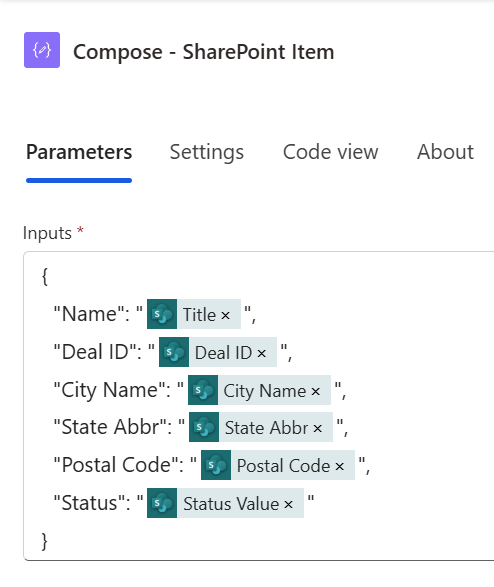
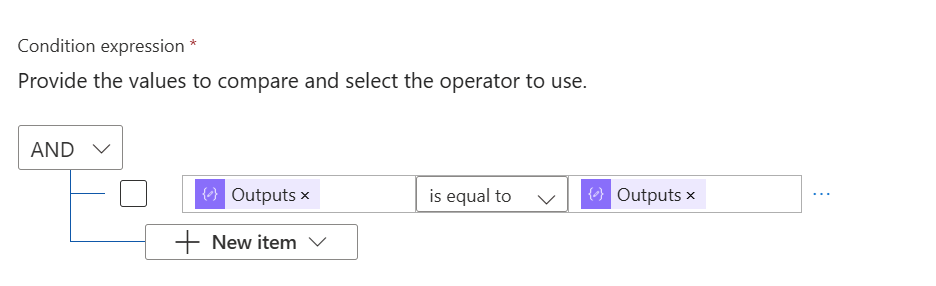
With both Compose actions created, remove all but the first row in the Condition block, then add the Outputs of the SharePoint and Salesforce JSON objects for comparison:

Now, the flow’s Condition logic is simplified! Rather than adding 20+ rows of conditions, the 20+ data values are added to JSON objects which are instead compared. This also helps the maker debug their flow going forward because they can review the Outputs of each Compose action in the flow run before the comparison, visually checking to see which values were mismatched:
Conclusion:
Worth noting, some makers may still prefer to add each row to the Condition block. Why? Well, adding each row is actually more efficient because of “short-circuit evaluation,” which is a pro-code concept. Essentially, the flow wouldn’t need to check against all 20+ data points if there was a mismatch earlier in the conditions, ultimately saving on compute resources and compute time. However, for many low-code solutions, there are times when the steps need to be simpler and more readable for ongoing support and/ or maintenance.
“I’m the world’s original gradualist. I just think ninety-odd years is gradual enough.”
Thurgood Marshall
#BlackLivesMatter
 console.log('Charles');