The Power Platform is Microsoft‘s collective of no-code/ low-code solutions. To supplement this platform, Dataverse is Microsoft’s secure, no-code/ low-code data storage solution. SQL Server is still a strong contender for data storage, but leveraging it requires some mastery of SQL. Dataverse, however, stores data in tables just like SQL, but doesn’t require any proficiency with SQL.
Another perk of Dataverse, it doesn’t need any server installs or patches by us. Microsoft takes care of all that, and the data is accessible from any browser.
To access the data, as a licensed and permissioned user, select Tables in the left-hand navigation pane of the Power Apps (or Power Automate) service:

From the Tables screen, app makers can browse already provisioned data tables or create their own. For the latter, there are several ways to get started storing their data without having to install and launch SQL Server Management Studio (SSMS):
- use Microsoft Copilot to create a Microsoft Dataverse table,
- create a table from an existing Microsoft Excel file,
- build a table from scratch, or
- create a virtual table, which is a definition of a table.

Making it even easier to get started (when compared to SQL), Dataverse databases come packaged with dozens of pre-built data tables. Promoting Power Platform adoption and improving a business’ ROI, Microsoft partnered with industry leaders to standardize many commonly used data tables across business-lines. Need an Email table? A Feedback table? Or maybe a User table? Well, Microsoft created them already, and populated them with data columns of varying data types, without app makers having to create the data tables themselves, as with SQL:

In addition to the pre-built data tables, Dataverse comes bundled with pre-configured data views, forms, charts, and dashboards for many of its tables, further speeding up the development of from scratch solutions. In SQL, devs and DBAs would need to create their own views, which are snapshots of the data with selections, filters, and sorts already applied. Moreover, SQL doesn’t come with data forms, but Dataverse does. These forms are user friendly and lets end-users submit data directly to the data table. On top of that, charts and dashboards are simple, scalable ways to visual the data without being a data scientist and/ or knowing how to create data reports:

Examining one of the pre-configured tables, the User table comes with 100+ columns. Obviously, there is the “Full Name” and “Position” data columns, as well as other standard columns, but if there is a data column missing, makers can Edit this table and add their own:

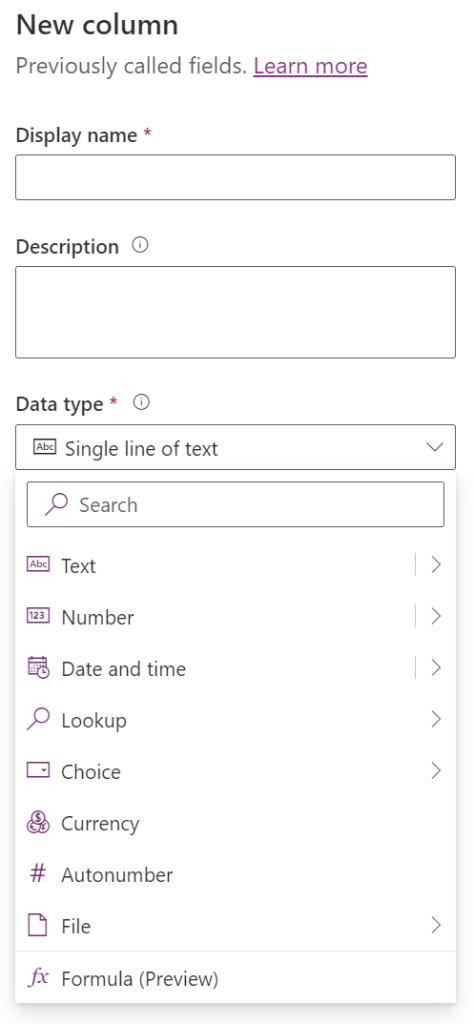
Before adding to any Dataverse data table, first check that the data column doesn’t already exist. If it doesn’t, then create a New column. There are several generic column types like Text, Number, Choice, and so forth, but there are also more granular data types. For instance, choosing to create a new text column for Email, Phone Number, or URL:

Conclusion:
Again, SQL is still a data storage choice for the Power Platform. However, for those not comfortable with SQL, Microsoft Dataverse is SQL-like enough, and it handles most of the heavy lifting. Just create a Power Platform environment and opt to include a Dataverse database, and everything is ready for use. Take advantage of the pre-designed data tables and develop solutions faster, without having to build all of the data tables, data forms, data views, and column keys…
“I would like to be remembered as a person who wanted to be free… so other people would be also free.”
Rosa Parks
#BlackLivesMatter
 console.log('Charles');