As previously explored, batching is the preferred and more efficient approach to processing a large volume of API requests. For every request, there is a call to the Microsoft Graph API and the accompanying response. With that in mind, things add up quickly as dozens, if not hundreds, of API requests are made. Batching bundles these requests together, thus reducing the number of overall calls as well as bundling the responses. And this really comes in handy when repeating the same request, like deleting bulk things. Simple scenario, deleting the items from an extremely large SharePoint Online list:
This Entries list in SPO has 400K+ items and it needs to go. Manually deleting these items will obviously take too long:
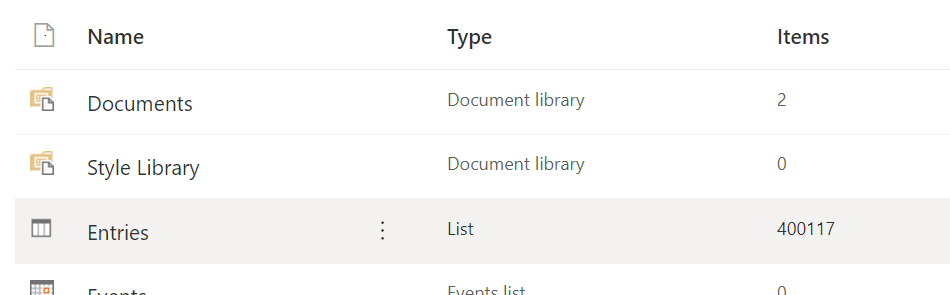
Instead, click the vertical dots, then choose Delete. This will completely remove the list as-is without needing to delete items individually, right?

It should, but it doesn’t because there’s an error! SPO can’t delete this list because there are way too many items. The supported threshold was exceeded a few hundred thousand items ago:
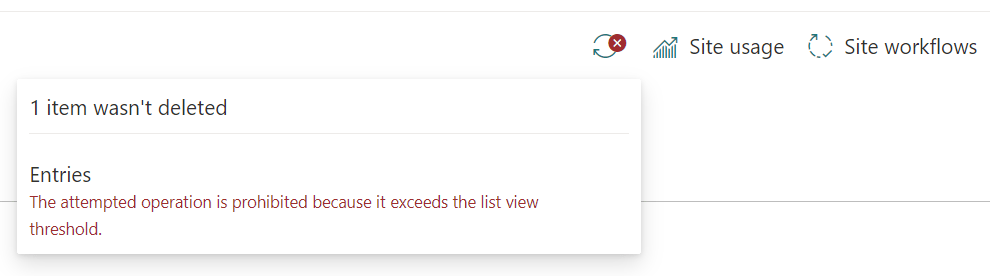
How to get around this? Script something with the Graph API and delete some items. Maybe query a few thousand records, then gradually delete them in batches and repeat. As there are more than a few thousand items to be queried, the items request response includes a @odata.nextLink property, which can be used to grab the next collection of list items to be processed:
if ($GraphReq.'@odata.nextLink'.Length -ne 0) {
    $nextLink = $GraphReq.'@odata.nextLink'
}
Essentially, one request gets the site ID, one request gets the list ID, then another request gets a subset of the list items to be deleted. Next, an array of object requests is populated. Each individual request of the array is requesting a DELETE and specifying which item to delete via the URL value:
$indexOf += 1
$batchOf += @{
    "url" = "/sites/$($SiteID)/lists/$($ListID)/items/$($ItemID)"
    "method" = "DELETE"
    "id" = "$($indexOf)"
    "headers" = @{
        "Content-Type" = "application/json"
    }
}
Quick reminder, batches process 20 requests max at a time. Once 20 request objects are added to the array, submit the batch requests, then loop and build the next batch. This will be largely processed a few hours:
if ($batchOf.Count -eq 20) {
    Get-RestAPIBatchResponse `
       -APIBatch $batchOf
    $indexOf = 0
    $batchOf = @()
}
NOTE: Too many recursive calls will throw a memory error. Though, even with the error, this reduces the list to a more manageable size. Now it can be deleted via the browser.
Moreover, before running the script, add a Start-Sleep to the recursive function, just before querying and processing the next bunch of records. Because PowerShell can process the requests pretty fast, Microsoft could throw a 429 error if they receive too many requests too quickly:
##  Process next batch
if ($nextLink -ne "") {
    Write-Host -F Yellow "Next:`t$($nextLink)"
    Start-Sleep -Milliseconds 2500

    Remove-SPOSiteListItemsByBatch `
        -GraphAPIEndpoint "$nextLink"
}
Note, the complete script is much longer than a few snips, but this basically tackles the larger concern. To see the full script, review Remove-SPOListItemsViaBatch.ps1 on GitHub.
Conclusion:
The Microsoft Graph API is powerful, but batching makes things more efficient. And with that efficiency, it can step in and tackle larger processing tasks…
“When I dare to be powerful – to use my strength in the service of my vision, then it becomes less and less important whether I am afraid.”
Audre Lorde
#BlackLivesMatter
 console.log('Charles');