There is a lot of power in automation. And as Microsoft works to empower citizen developers, they’ve introduced another Date and time function, dateDifference(). This expression accepts two date parameters and outputs a string value:

The expression’s string result is a calculation measuring the number of days, hours, minutes, and seconds between two dates:
- dd.hh:mm:ss
dateDifference(
  addMinutes(utcNow(),123456),
  addSeconds(utcNow(),-7890)
)
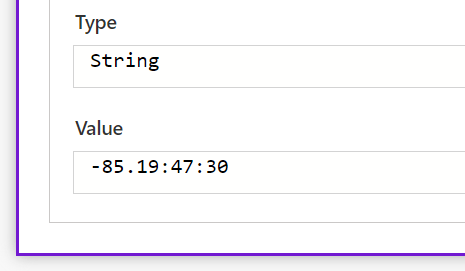
Because the expression returns a string value, flow makers can just parse it to get the specific value(s) they need:
E.g., getting the calculated number of days, split() the string using the “.” as a delimiter, then return the first() item of the array.
first(
  split(
    variables('tempStr'),
    '.') ) )
E.g., getting the calculated number of hours, replace() the lone “.”, then split() the string using the “:” as a delimiter, skip() the first item of the initial array, then return the first() item of the new array.
first(
  skip(
    split(
      replace(
        variables('tempStr'),
        '.', ':'), ':'), 1 ) )
E.g., getting the calculated number of minutes, split() the string using the “:” as a delimiter, skip() the first item of the initial array, then return the first() item of the new array.
first(
  skip(
    split(
      variables('tempStr'),
      ':'), 1) )
E.g., getting the calculated number of seconds, split() the string using the “:” as a delimiter, then return the last() item of the array.
last(
  split(
    variables('tempStr'),
    ':') ) )
Conclusion:
This new expression really simplifies things. Prior to this, flow makers needed to calculate the difference between two date values using nested arithmetic expressions and flow variables.
E.g.,
div(
    sub(
        ticks('2023-02-15T04:23:42.2756574Z'),
        ticks('2022-12-30T04:23:42.2287803Z')
    ),
    variable('numOfTicksPerDay')
)
“We have simply got to make people aware that none of us are free until we’re all free, and we aren’t free yet.”
Opal Lee
#BlackLivesMatter
 console.log('Charles');