Mail merge is still a thing. Why? Because after all these years, it continues to get the job done. But with more businesses using Microsoft Lists, can mail merge still do its job?
The short answer, yes. However, Microsoft Word can’t connect to Microsoft Lists directly. If we open the mail merge data source dropdown, there are plenty of options. Lists isn’t one of them though:

Fret not, there is an alternative approach. Just import the data from Lists into Excel, then use Excel as a mail merge data source. How? Microsoft Lists are actually SharePoint Lists, and Excel can connect to SharePoint. Leverage Excel‘s Get Data feature and load the data From SharePoint Online List:

Sample:
SharePoint Online list with two columns:
- Name
- State

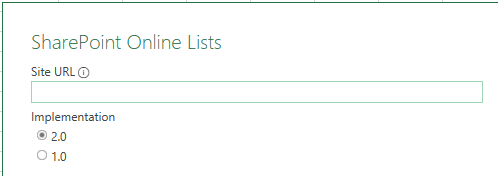
Copy and paste the SharePoint Site URL, toggle Implementation to 2.0, then click OK:
https://contoso.sharepoint.com
Excel will connect to SharePoint and list all of the Lists under this site. Find and select the target List, and preview the data:

If the data needs tweaking before being imported into Excel, then click Transform Data. Otherwise, click Load and import the List items as previewed:

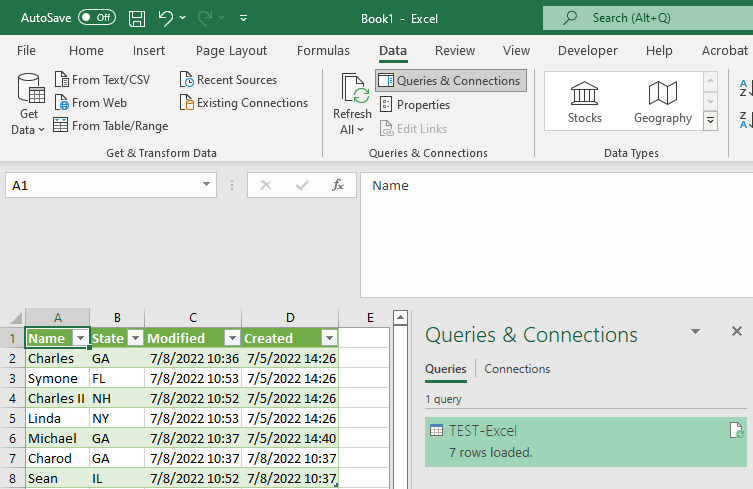
Finally, with the List items imported, Excel creates a connection to the source data. This connection, listed under the Queries & Connections pane, will be named after the SPO list and binds Excel to SharePoint:

The connection represents a one-way data dependency. Excel needs SharePoint, but SharePoint doesn’t need Excel. But changes made in SharePoint can be reloaded into Excel at any time. Whether items are added, removed, or updated, refreshing the connection will bring Excel up to date:
E.g., updating everyone’s states.
Conclusion:
Microsoft Word can’t directly connect to many data sources, but Microsoft Excel can. Connect to the data source via Excel, then use that connection to build a data source for Word‘s mail merge.
“As much as some people like to put down ‘political correctness,’ if it wasn’t for political correctness, I wouldn’t be free right now.”
W. Kamau Bell
#BlackLivesMatter
 console.log('Charles');