Often enough, calculating the number of days in a month becomes a developer’s task when working with calendars. Back in my newbie days, my solution was creative, and it worked, but it wasn’t very efficient. Instead of an elegant formula, I just parsed a date value from a string inside a Try-Catch block:
try {
   string t = "2/31/2022";
   DateTime d = DateTime.Parse(t);
}
- If error, then try { DateTime.Parse(“2/30/2022”); }
- If error, then try { DateTime.Parse(“2/29/2022”); }
- If error, then try { DateTime.Parse(“2/28/2022”); }
The first DateTime.Parse() to not throw an error was a valid date. Again, this worked but was inefficient. Switching approaches soon after, I would instead get the first day of the following month, then subtract 1 day. This was more efficient and is still my go-to when a function isn’t already available, as with Power Automate…
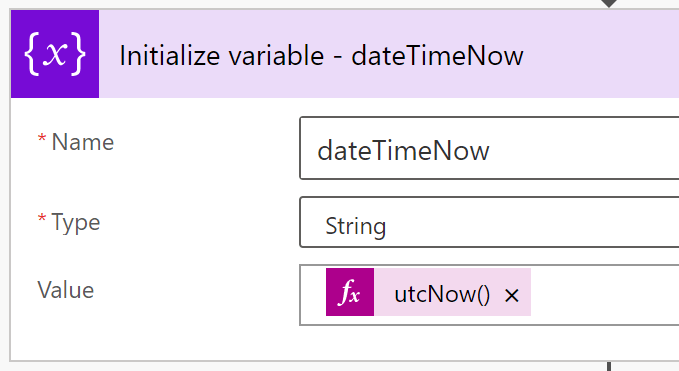
Although not necessary to initialize multiple variables, doing so helps outline the steps. My first variable stores today’s date and time as a string using the utcNow() expression:
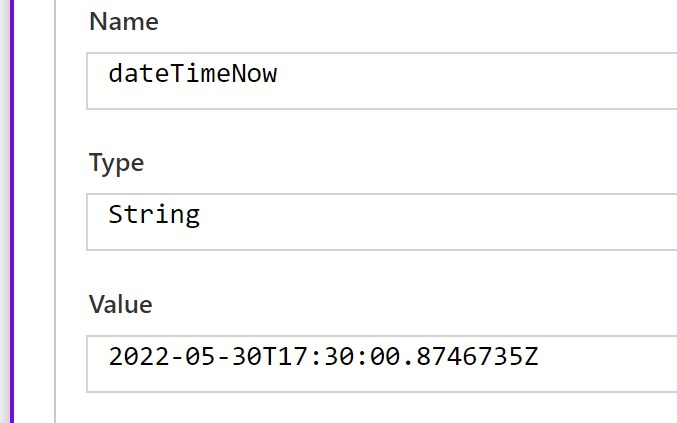
Sample Date:
Date: yyyy-MM-dd
Time: hh:mm:ss.[milliseconds]
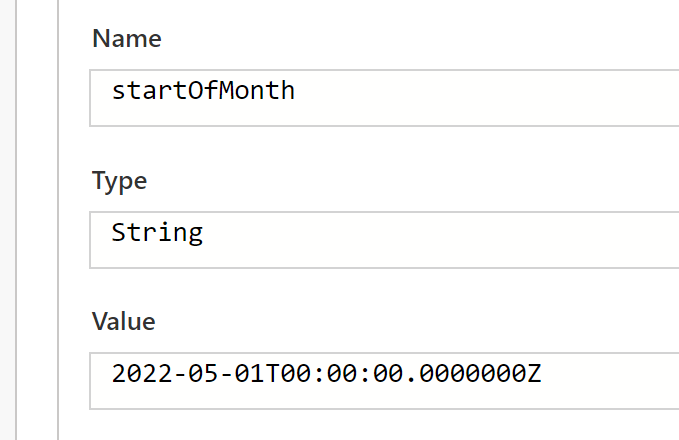
Using another expression, startOfMonth() outputs the first day of the month of a provided date value. Pass along the dateTimeNow variable as a parameter:
startOfMonth( variables('dateTimeNow') )
Introducing another expression, addDays(), build on the previous snippets and calculate the total number of days in the month. Getting started, pass a date value to a startOfMonth() expression. Wrapping that result in another expression, use addDays() and add 31 days. This shifts the date into next month. Passing this new date into another startOfMonth() expression, get the first day of the next month. Finally, wrap this resulting date into one more addDays() expression, but this time, add a negative day:
addDays(
    startOfMonth(
        addDays(
            startOfMonth( utcNow() ),
        31)
    ),
    -1
)

Lastly, to return the number of days as an integer, format and parse the above snippet:
int(
    formatDateTime(
        variables('endOfMonth'),
        'dd'
    )
)

Conclusion:
Power Automate is a bit more clunky than high-level programming languages, but with some nested expressions, it still gets the job done…
“Politics is the art of making the people believe that they are in power, when in fact, they have none.”
Mumia Abu-Jamal
#BlackLivesMatter
 console.log('Charles');