Auditing [OneDrive for Business] sites with PowerShell and the Microsoft Graph API uncovered several hidden lists. The SharePointHomeCacheList is one of these lists, but it offers more information than the previously discussed lists. Continuing the trend of examination:
- Create script variables.
[System.String] $endUserAccount = "charles@contoso.com"
$endUserAccount = $endUserAccount.Replace("@", "_").Replace(".", "_")

[System.String] $tenantName = "contoso"
[System.String] $requestAPI = ""

[System.String] $siteGuid = ""
[System.String] $listGuid = ""
[System.String] $api = ""
- Query and return target site ID.
$api = "/sites/$($tenantName)-my.sharepoint.com:"
$api += "/personal/$($endUserAccount)?$select=id,name,webUrl"

##  Get Site ID
foreach($site in (Get-GraphAPIResponse -GraphAPIRequest "$api")) {
    $siteGuid = "$($site.id)"
}
NOTE: [OneDrive for Business] sites are provisioned under the “personal” managed path.
NOTE: “Get-GraphAPIResponse” is a custom function that returns the response as an object.
- Query and return target list ID.
$api = "/sites/$($siteGuid)/lists"
$api += "?select=id,list,lastModifiedDateTime,displayName,name"
$lst = "SharePointHomeCacheList"

##  Get List ID
foreach($objList in ((Get-GraphAPIResponse -GraphAPIRequest "$api"))) {
    foreach($list in ($objList.value | ? { $_.name -eq "$($lst)" })) {
        $listGuid = "$($list.id)"
    }
}
E.g., target list object

- Iterate target list items:
- Count unique content types.
- Count unique list item names.
[System.Collections.Hashtable] $cTypes = @{}
[System.Collections.Hashtable] $lNames = @{}

$api = "/sites/$($siteGuid)/lists/$($listGuid)/items"
$api += "?expand=fields"

##  Get List Items
foreach($objItem in ((Get-GraphAPIResponse -GraphAPIRequest "$api"))) {
    foreach($item in ($objItem.value | Sort-Object createdDateTime -Descending)) {

        [System.String] $thisType = "$($item.contentType.name)"
        [System.String] $thisPath = "$($item.webUrl)"
        $thisPath = $thisPath.Substring($thisPath.IndexOf("/personal"))

        Write-Host -F Magenta $item.id
        Write-Host -F Magenta $thisType
        Write-Host -F Magenta $item.createdDateTime
        Write-Host -F Magenta $item.lastModifiedDateTime
        Write-Host -F Magenta $thisPath

        if ($item.fields -ne $null) {
            [System.String] $thisName = "$($item.fields.LinkTitle)"
            Write-Host -F White "LinkTitle:  $thisName"

            if ($lNames.ContainsKey("$thisName") -eq $false) {
                $lNames.Add("$thisName", 0)
            }
            $lNames["$thisName"]++
        }
        $item.fields

        if ($cTypes.ContainsKey("$thisType") -eq $false) {
            $cTypes.Add("$thisType", 0)
        }
        $cTypes["$thisType"]++
    }
}
E.g., target list item object.
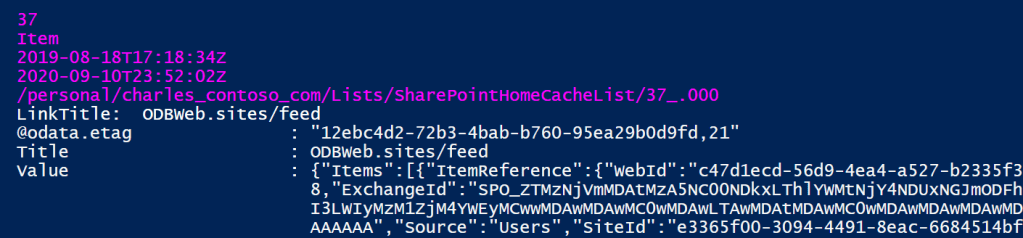
Export hash table objects:
- Unique content types.
- Unique list item names.
$cTypes.GetEnumerator() | Sort-Object Name | ft
$cTypes = @{}

$lNames.GetEnumerator() | Sort-Object Value -Descending | ft
$lNames = @{}
E.g., export of content type counts.

E.g., export of list item names.

Key Takeaways:
There are several items with GUID names, but also items with more descriptive names:
| ODBWeb.sites/feed | ODBWeb.substrate.recommended | SPHomeWeb:activities |
| SPHomeWeb:companyportal | SPHomeWeb:links/promoted | SPHomeWeb:myrecentdocuments |
| SPHomeWeb:news | SPHomeWeb:orglinks | SPHomeWeb:sites/feed |
| SPHomeWeb:sites/followed | SPHomeWeb:sites/recent | SPHomeWeb:sites/suggested |
| SPHomeWeb:suggestedactivities | WebPartCache |
Some of these list items have a LOT of information, so only a few will be reviewed below. Also, its helpful that these items share a common structure. Each item has a Value field formatted as a JSON object with two properties:
- Items – returned as an array.
- Type – returned as a string.
SPHomeWeb:myrecentdocuments
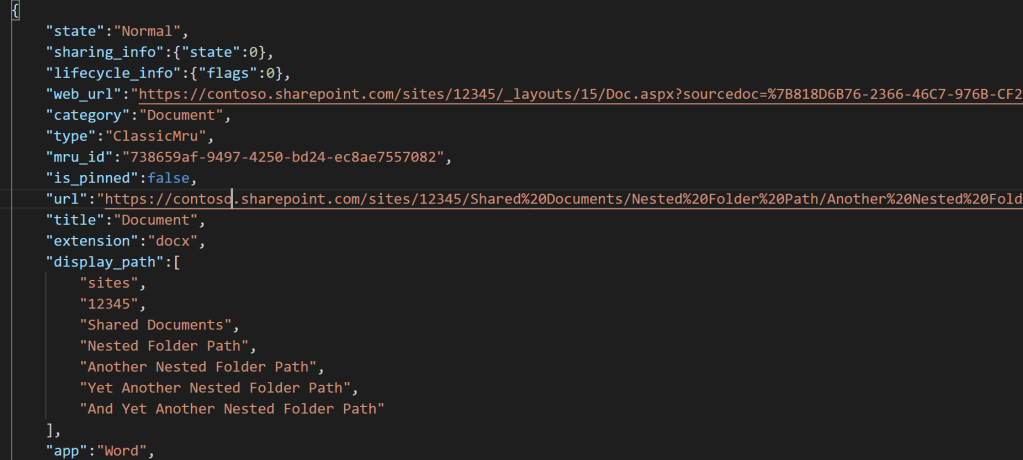
As the name implies, SPHomeWeb:myrecentdocuments contains a list of recent user documents. Noteworthy properties of this list item are:
- sharing_info.state
- 0 indicates NO sharing.
- 1 indicates sharing.
- display_path
- Splits the relative file path into an array on the url slashes.
- Splits the relative file path starting with the managed path.
- sharepoint_info
- Indicates location of the document.
- Object with other site specific information:
| list_id | site_id | tenant_id |
| list_item_id | site_url | web_id |
| list_item_unique_id |
SPHomeWeb:news
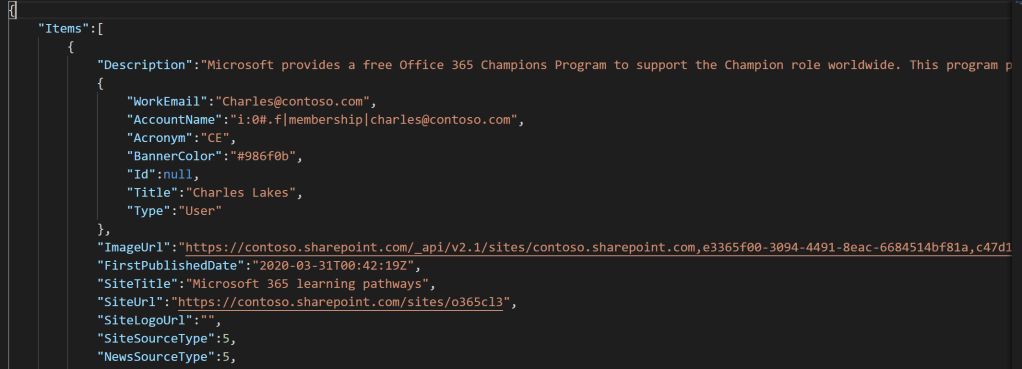
This value array lists [SharePoint Online] news post objects with its own notable key-value pairs. Title is the headline and Description the body, but the nested Site object references the source SPO site:
| BannerColor | BannerImageUrl | WebTemplate |
| Id | Url | OriginalUrl |
| Title | ContentTypeId | Acronym |
SPHomeWeb:sites/recent
Lastly, this value array lists recent user site objects. For instance, BannerColor indicates the hexadecimal color code of the site logo, but additional properties are:
| Title | Acronym | BannerColor |
| Id | Url | OriginalUrl |

Conclusion:
There’s so much data available for the audits. Its actually amazing how much is available to query with PowerShell and the Microsoft Graph API. Get familiar with these tools as they will only become more powerful…
“You just gotta keep going and fighting for everything, and one day you’ll get to where you want.”
Naomi Osaka
#blacklivesmatter
 console.log('Charles');
Pingback: OneDrive: Hidden List (SharePoint Home Cache List – Part II) | console.log('Charles');