So yeah, this was an unintentional blog series. Welcome to part 4 out of #shrugs because there were more hidden lists than expected…
But this time, there’s a “request” to audit access requests of an individual’s [OneDrive for Business] account.
E.g., a PDF was shared with an external collaborator.
- Create the script variables.
[System.String] $endUserAccount = "charles@contoso.com"
$endUserAccount = $endUserAccount.Replace("@", "_").Replace(".", "_")

[System.String] $tenantName = "contoso"
[System.String] $requestAPI = ""

[System.String] $siteGuid = ""
[System.String] $listGuid = ""
[System.String] $api = ""
- Query and return target site ID.
$api = "/sites/$($tenantName)-my.sharepoint.com:/"
$api += "personal/$($endUserAccount)?$select=id,name,webUrl"

##  Get Site ID
foreach($site in (Get-GraphAPIResponse -GraphAPIRequest "$api")) {
    $siteGuid = "$($site.id)"
}
Note: Get-GraphAPIResponse is a custom function that invokes and returns the REST object.
- Query and return target list ID.
$api = "/sites/$($siteGuid)/lists"
$api += "?select=id,list,lastModifiedDateTime,displayName,name"
$lst = "Access Requests"

##  Get List ID - Access Requests
foreach($objList in ((Get-GraphAPIResponse -GraphAPIRequest "$api"))) {
    foreach($list in ($objList.value | ? { $_.name -like "*$($lst)*" } | Sort-Object displayName)) {
        $listGuid = "$($list.id)"
    }
}
e.g., target list object

- Iterate target list items and item fields.
$api = "/sites/$($siteGuid)/lists/$($listGuid)/items"
$api += "?expand=fields"

##  Get List Items
foreach($objItem in ((Get-GraphAPIResponse -GraphAPIRequest "$api"))) {
    foreach($item in ($objItem.value | Sort-Object createdDateTime -Descending)) {
        foreach($field in $item.fields) {
            $field
        }
    }
}
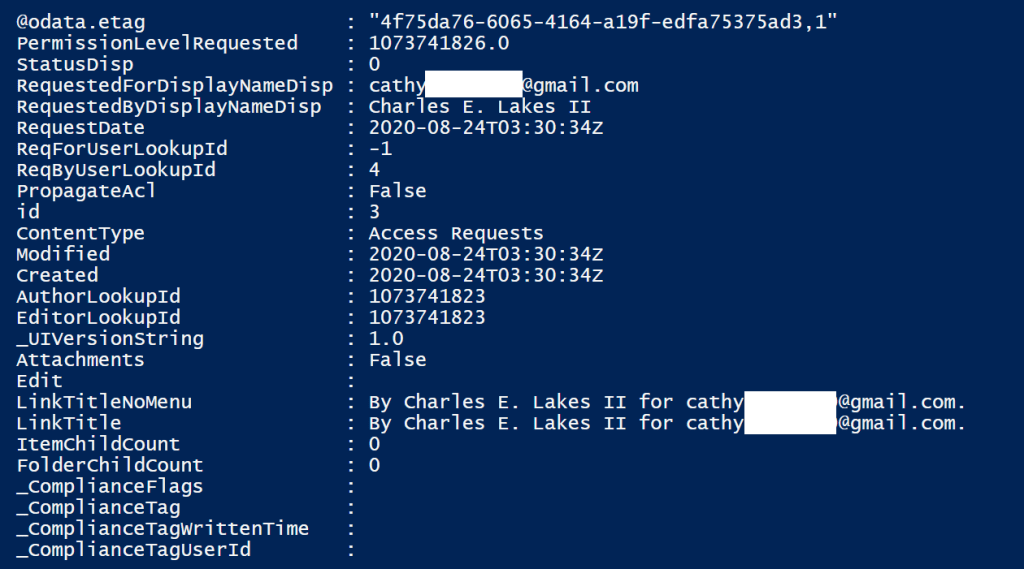
e.g., target list item object fields
Key Takeaways:
- Access Requests is a content type.
- Access Requests list items can be audited for:
- RequestDate
- RequestedForDisplayNameDisp
- Cathy is an external collaborator in this example.
- RequestedByDisplayNameDisp
- PermissionLevelRequested specifies whether Cathy can view or modify the shared PDF.
Conclusion:
[OneDrive for Business] is powerful and part of its power lies in its sharing capabilities. This is useful for end-users, but can be a pain for admins. Because of this, admins and developers may need to audit these file shares. Luckily its all hosted in the individual’s ODfB site…
“Our legal system and the way our country is run is based upon discrimination.”
Sandra Bland
#blacklivesmatter
 console.log('Charles');