[OneDrive for Business] sites are [SharePoint Online] site collections. Because of this, ODfB sites have hidden lists which are discoverable using scripted solutions.
One of these hidden lists is tasked with tracking user activity. The Microsoft Graph API is again helpful to query these hidden list records for reporting…
- E.g., instances of user comments.
To begin, populate the target account and tenant name variables. The other variables are populated later, but ODfB sites typically use the end-user’s email address:
[System.String] $api = ""
[System.String] $emailAccount = "charles@contoso.com"
$emailAccount = $emailAccount.Replace("@", "_").Replace(".", "_")

[System.String] $tenantName = "contoso"
[System.String] $siteGuid = ""
[System.String] $listGuid = ""
Note:
Special characters, “.” and “@”, of the email address are converted to underscores within the site URL.
Although the account has been specified as a target, the site ID is still required to iterate the hidden lists. Get the site ID using the tenant name and relative site path:
$api = "/sites/$($tenantName)-my.sharepoint.com:/"
$api += "personal/$($emailAccount)"

##  Get Site ID
foreach($site in (Get-APIResponse -API "$api")) {
    $siteGuid = "$($site.id)"
}
Next up, use the $siteGuid to query the site lists, but just get the $listGuid of the User Activity list:
- Filter the results on the list name.
$api = "/sites/$($siteGuid)/lists"
[System.String] $n = "userActivityFeedHiddenList"

##  Get List ID
foreach($o in ((Get-APIResponse -API "$api"))) {
    foreach($list in ($o.value | ? { $_.name -like "*$($n)*" })) {
        $listGuid = "$($list.id)"
    }
}
- e.g., sample export

Finally, using the $siteGuid and $listGuid values, build the API and query the hidden list items:
- Filter the results to items with activity event data.
$api = "/sites/$($siteGuid)/lists/$($listGuid)/items"
$api += "?expand=fields"

##  Get List Items
foreach($objItem in ((Get-APIResponse -GraphAPIRequest "$api"))) {
    foreach($item in ($objItem.value | ? { $_.fields.ActivityEvent -ne $null })) {

        $i = $item.fields
        Write-Host -F Cyan "Activity Type:"
        Write-Host -F White "$($i.ActivityEventType)"
        Write-Host -F Cyan "Activity Id:"
        Write-Host -F White "$($i.ActivityId)"
        Write-Host -F Cyan "Activity Event:"
        Write-Host -F White "$($i.ActivityEvent)`n`n"
    }
}
What’s the result? An entry with an Activity Type value of 17 associated with comments. The Activity Id confirms this, but the Activity Event has the details:
- The comment “good content“
- Was added to page “A bit of Anime History“
- Under the SPO site “Training Portal“.

Bonus #1:
Comment replies have an Activity Type value of 16.
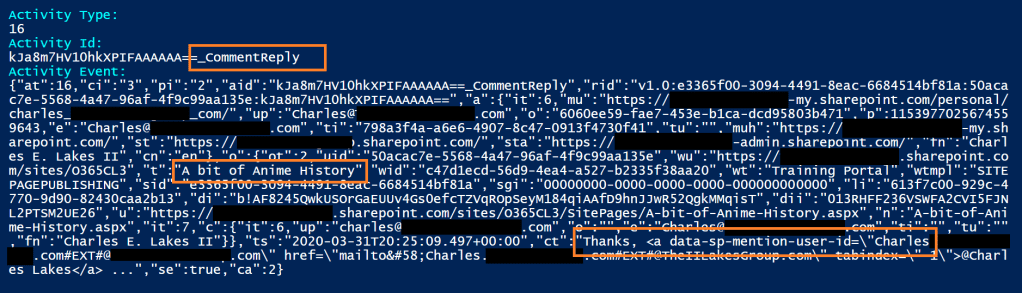
Bonus #2:
Comment mentions have an Activity Type value of 15..

| Action | Type Value |
|---|---|
| Modern Page Comment | 17 |
| Modern Page Comment Reply | 16 |
| Modern Page Comment Mention | 15 |
Conclusion:
Again, the data is there. Because of this, the data can be queried and reported on. PowerShell and the Microsoft Graph API make it easy to query and report on user activity…
“You’ve got to learn to leave the table.”
Eunice Kathleen Waymon
#blacklivesmatter
 console.log('Charles');