[OneDrive for Business] accounts are essentially [SharePoint Online] site collections. Because of this, ODfB sites also have several hidden lists that are discoverable with scripted solutions.
One hidden list is titled Sharing Links and it keeps a record of shared items. Though the Microsoft 365 Admin center has a nice OneDrive activity report, custom solutions are still fun to explore…
- E.g., a total number of shares for an account.
To begin, specify the target site/ account and org tenant name. The other variables are populated later, but target account URLs may use the person’s email address:
[System.String] $api = ""
[System.String] $emailAccount = "charles@contoso.com"
$emailAccount = $emailAccount.Replace("@", "_").Replace(".", "_")

[System.String] $tenantName = "contoso"
[System.String] $siteGuid = ""
[System.String] $listGuid = ""
Note:
Special characters, “.” and “@”, of the email address are converted to underscores within the URL.
Although the ODfB account has been specified as a target, the site ID is required to query hidden lists. Get the site ID using the tenant name and relative site path:
$api = "/sites/$($tenantName)-my.sharepoint.com:/"
$api += "personal/$($emailAccount)"

##  Get Site ID
foreach($site in (Get-APIResponse -API "$api")) {
    $siteGuid = "$($site.id)"
}
Note:
OneDrive for Business sites live under the /personal/ managed path.
Next step, use the $siteGuid to query the site collection lists, but only store the $listGuid of the Sharing Links list. Filter the results using the list name…
$api = "/sites/$($siteGuid)/lists"
[System.String] $list = "Sharing Links"

##  Get List ID
foreach($o in ((Get-APIResponse -API "$api"))) {
    foreach($list in ($o.value |?{$_.name -eq "$list"})) {
        $listGuid = "$($list.id)"
    }
}

Finally, using the $siteGuid and $listGuid values, query the collection of list items, then count the total number of items:
$api = "/sites/$($siteGuid)/lists/$($listGuid)/items"
[System.Int32] $count = 0

##  Get List Items
foreach($objItem in ((Get-APIResponse -API "$api"))) {
    $count += $objItem.value.Count
}
Write-Host -F Cyan "Sharing instances:  $($count)"
Bonus:
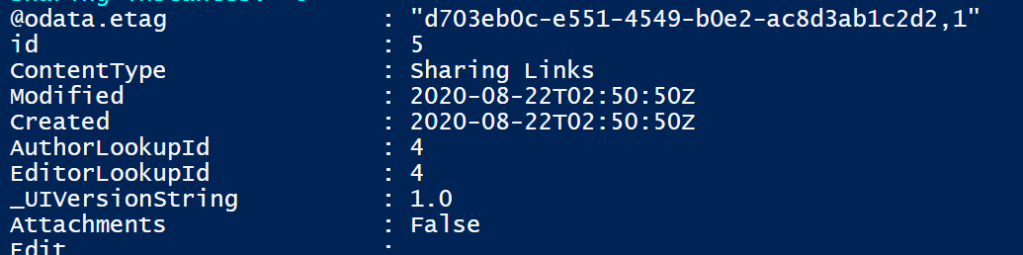
Expanding the list item fields in the API query doesn’t reveal much new information, but its an interesting find that Sharing Links is also a ContentType.
$api = "/sites/$($siteGuid)/lists/$($listGuid)/items"
$api += "?expand=fields"

##  Get List Item Count
foreach($objItem in ((Get-APIResponse -APIRequest "$api"))) {
    foreach($item in ($objItem.value | Select -First 1)) {
        $item.fields
    }
}
Conclusion:
The data is there. Microsoft generated reports are great, but scripted solutions can present the data without having to access the GUI…
“Colonialism is the cousin of slavery.”
Chadwick Boseman
#blacklivesmatter
 console.log('Charles');