I recently wrote about external sharing in SPO. If you externally share content, then you may need to audit external accounts in your tenant.
Note: Your tenant must allow external sharing.
The Microsoft 365 Admin Center is your first resource to audit and report these external accounts. Secondly, you can use PowerShell to audit specified sites. You may not need to report against your entire tenant, but just the Marketing site.
PowerShell is ideal for this. I used to be against PowerShell, but no more. PowerShell is your friend. And it helps that SharePoint Diary has plenty of examples on working with SPO via the client context.
Note: Ensure that you are a site collection administrator (SCA) for this script.
(1) Connect to the site.
(2) Load site groups and site users.
##
$Ctx = New-Object Microsoft.SharePoint.Client.ClientContext("https://{tenant}.sharepoint.com/teams/Marketing")
$Ctx.Credentials = New-Object Microsoft.SharePoint.Client.SharePointOnlineCredentials($Creds.UserName, $Creds.Password)
$Ctx.ExecuteQuery()

##
$groups = $Ctx.Web.SiteGroups
$users = $Ctx.Web.SiteUsers

##
$Ctx.Load($groups)
$Ctx.Load($users)
$Ctx.ExecuteQuery()
When you iterate through the $groups object, you’ll discover some hidden groups. Group titles will begin with SharingLinks and each group is associated with an externally shared file or folder. Additionally, each group will list the user accounts with shared access. Lastly, the group description will indicate the shared content.
When you iterate through the $users object, you’ll have a listing of all user accounts with access. However, you will need to exclude user accounts from your organization.
e.g.,
$users | ? { -not ($_Email -like “*{domain}*”) }
$users | ? { $_.IsEmailAuthenticationGuestUser -eq $true }
$users | ? { $_.IsShareByEmailGuestUser -eq $true }
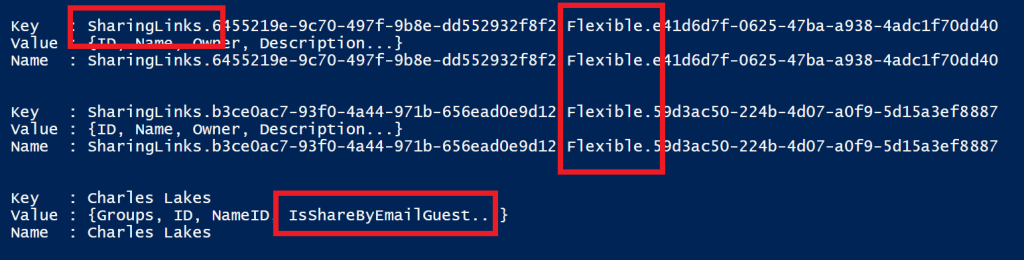
NOTE: ‘Flexible’ indicates “Specific People” was selected when the link was created.
Conclusion: There is more than one way to audit and report external accounts within your tenant. PowerShell offers automation, flexibility, and creativity. Learn PowerShell and its possibilities…
“You can’t use up creativity. The more you use, the more you have.”
Maya Angelou
 console.log('Charles');